• Log in

Menu

Simulator Logos

Try BrandCrowd for Free! The World's #1 Simulator Logo Maker.

Simulator - Console Gaming Entertainment
Simulator - Gamepad Console Gaming
Simulator - Gaming Electronic Console
Simulator - Game Controller Console
Filters
Logo Styles
null Icon
Color
null Icon
  1. Go to previous page
    null Icon
  2. Page 1 of 1
  3. 1
  4. Go to next page
    null Icon

1 - 26 of 26 simulator logo designs

Welcome to our simulator logo collection! Here at BrandCrowd, we understand the importance of a strong and captivating logo for your simulator business. Whether you're in the gaming, flight, driving, or any other simulation industry, our logo maker is here to help you create a logo that truly represents your brand. Our simulator logo collection features a wide range of professionally designed logos that are perfect for your business. From sleek and modern designs to bold and dynamic ones, we have something to suit every style and preference. Our logos are created by talented designers who understand the unique needs of the simulator industry, ensuring that your logo stands out from the competition. Using our logo maker is quick and easy. Simply browse through our collection, select a logo that catches your eye, and customize it to make it your own. You can change the colors, fonts, and layout to match your brand's identity. Once you're satisfied with your design, you can download it in high-resolution format and start using it right away. Don't settle for a generic logo when you can have a unique and memorable one that represents your simulator business. Start exploring our simulator logo collection today and let BrandCrowd help you create a logo that leaves a lasting impression on your audience.

Making Your simulator Logo Is Easy With BrandCrowd Logo Maker

Create a professional Simulator logo in seconds with our free Simulator logo maker. BrandCrowd logo maker is easy to use and allows you full customization to get the Simulator logo you want!
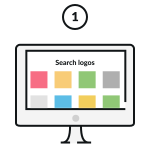
Pick A Simulator Logo

Pick one of the Simulator logos on this page or update your search.
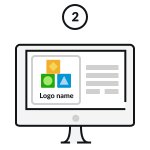
Customize Your Simulator Logo

Change colours, fonts, add a tagline… Our Simulator logo maker is 100% customizable and easy to use.
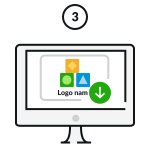
Download Your Simulator Logo!

Download your Simulator logo and start sharing it with the world!

Enter any keyword and we will start making logos for you

How do I make a Simulator logo with BrandCrowd?

Creating your Simulator logo easy with BrandCrowd. Just follow these steps and you'll have a Simulator logo ready to share with the world in seconds.

Search-icon

1. Start searching:

To find Simulator logos relevant to your business enter your business name - We'll automatically show you Simulator logos related to your business. You can browse the logos and choose one you love.

Refine-search-icon

2. Refine your search:

If you can't find the perfect Simulator logo, you can refine your search by entering related keywords. We'll show you more logos related to your search.

Logo-shortlist-icon

3. Create a Simulator logo shortlist

To make life easier you can "shortlist" logos that you like. Simply click the heart symbol and we'll add the Simulator logos to your shortlist.

Edit-logo-icon

4. Edit your Simulator logo

Once you've found a Simulator logo that you love, you can customize the logo colors, fonts and layout. You can even add more embellishments with shapes.

Edit-logo-icon

5. Preview your Simulator logo

When you're done editing you can easily preview your logo on apparal, signage and more to see how it looks in real life.

Download-logo-icon

6. Download your Simulator logo

Once you're done customizing, you can download your Simulator logo - you'll get access to all the logo files you need, instantly

What elements make a beautiful logo?

It's easy to create a logo with BrandCrowd's logo maker - but making sure you get these design elements right will ensure your logo is perfect. Your logo should represent your brand, help people remember you and provide insight into your services. Choosing the right colors, layout, fonts and shapes are key to making sure your logo rises above competitors.

two-Simulator-logo-examplestwo-Simulator-logo-examples
Logo-type-icon

Logo type

There's an array of different logo types to choose from. Does your Simulator logo need an icon or just text? Should it have a combination of both?

Find out more

Logo-colour-icon

Logo colors

Want to convey trustworthiness? Want to appear fun and outgoing? Choosing the right colors for your Simulator logo makes all the difference.

Find out more

Logo-font

Logo font

In the same way colors can convey meaning, so too can fonts and typography. Need a serious Simulator logo or maybe something more gentle? Make sure to choose your fonts wisely.

Find out more

Frequently asked questions

Creating that perfect simulator logo with BrandCrowd is easy - but just in case, here's some FAQs to help you get started.

What is the BrandCrowd simulator logo maker?

BrandCrowd's simulator logo maker allows you to generate and customize stand-out simulator logos in seconds. BrandCrowd gives you access to a professional library of thousands of customizable simulator logo designs - making creating your simulator logo inexpensive and straightforward. Our logos, created by designers around the globe, give you unlimited possibilities.

Do I get a transparent version of my simulator logo?

Absolutely! A transparent version of your simulator logo is provided when you download in a PNG format. Even if you've chosen a solid background for your simulator logo, we'll provided a version of your logo with a transparent background for your convenience - perfect for use on your website.

What layout works best for simulator logos?

You want your simulator logo to standout above competitors. Your logo should tell your audience, customers, fans and competitors that you mean business. There's no single answer for what layout your simulator logo should have - but keep in mind what message your want to convey with your logo. A simple layout can convey elegance and sophistication, while a more dynamic layout can mean fun or adventure. Search our logo collection for a design then customize it according to your needs. Remember you can also research simulator logos - pay attention to their layout, color choices, design themes and fonts.

What text should I choose for my simulator logo?

What's in a name? If you haven't already got a name for your simulator logo then here's some tips. You want to use text and a name that describes your business, the caliber of service you provide and one that resonates with customers. If you're stumped, research other companies that use simulator logos for some ideas. Remember your simulator logo should have a catchy and non-offensive name that sits well with the whole team. Try to keep the logo text short and simple using a bold clean font, so it's easily recognisable on your simulator logo.

How do I find the right simulator logo?

Simply put, simulator logos are visual representations of what your business is all about. The logo you choose will become synonymous with your brand, so it pays to choose wisely. BrandCrowd offers access to a library packed with simulator logos created by professional designers from around the world. Find the perfect simulator logos is as simple as searching the library, customizing the logo to your liking and downloading. Remember, keeping your simulator logo simple with three or fewer colors and clean fonts produces an effective, eye-catching logo.

How do I add a tagline to my simulator logo?

It's easy to enhance your simulator logo with a tagline. A tagline is usually added at the bottom of your logo and consists of a short piece of text like a motto or catchphrase. Taglines that work include three to seven memorable words. Like an advertising jingle or popular song, this additional text on your simulator logo helps further associate your design with your brand. You can add a tagline in a few clicks with BrandCrowd's free logo maker.

Can I download my simulator logo instantly?

Yes. Now that you've created the perfect simulator logo, it's time to put your design to work. BrandCrowd allows you to download your logo instantly and gives you access to all the files you need. BrandCrowd provides files perfect for producing business cards, marketing and print materials, for using on your website or blog and for branding those social media posts. All the logo files you need are available in your account.

Do I get my simulator logo in vector format?

Of course. Your simulator logo from BrandCrowd is provided in several formats including vector files (PDF and SVG). No matter how large you want your simulator logo, it'll look great. Vector files are used to create print layouts and illustrations as they ensure the same quality appearance across all formats and sizes.