How To Choose an AI Logo Generator
Updated July 31, 2025
Creating a logo might be daunting, especially if you don’t have a big budget or design experience. That’s where an AI logo generator comes in. This powerful tool harnesses artificial intelligence to produce logo designs as quickly as a snap of a finger. But with multiple options available, how do you know which is right for your business?
Don’t worry because we’ve got you covered! In this article, we’ll walk you through what AI logo generators are, their benefits, and the key features you should consider when choosing one.
Let’s get started!
What is an AI Logo Generator?
An AI logo generator uses machine learning to analyze common logo patterns, designs, colors, typography, shapes, styles, and trends. Based on this data, plus some filtering based on criteria or keywords you set, their algorithm will generate logos to match your desired look. And just like that, you have your logo!
Technological advancements have made AI logo generators faster and more refined than ever. They are indeed the future of logo design.
Advantages of Using An AI Logo Generator

Using AI logo generators has multiple benefits. Some of them are:
Saves time: No need to spend long hours just to create a design! With AI, you can have a design in seconds.
Saves money: Whether you’re looking at a marketing agency or a freelance designer online, it can be expensive. But AI logo generators are usually free (or paid with a minimum fee only).
Beginner-friendly: AI logo generators are perfect for business owners who don’t have any design experience or creative skills, as you don’t need to design from scratch. AI will do the heavy lifting for you. All they need is your vision.
Easy to use: AI is also great for people who may not be technologically savvy. These tools are usually simple and easy to navigate, even if you don’t have any experience with design software.
Lots of options: AI can provide multiple designs and styles. From there, you can just pick which logo matches your business the most.
Creative ideas: AI logo generators are not only for newbies but also for pro designers. If you are stuck in a rut, the generator can be used as a starting point to help spark some ideas or give design concepts you might not have thought of yet.
What To Consider When Choosing an AI Logo Generator

Now’s the time to choose the right AI logo generator for your business. Keep these factors in mind while assessing your choices:
User-friendly interface: Look for generators with a simple interface. The buttons should be easy to understand and navigate. It’s also best if the tool has a simple tap or drag-and-drop mechanism for easier use.
Customization options: While generators are great for producing a finished design quickly, you’ll want one that allows you to customize the design further. This will ensure that your logo is unique and tailored to your preference.
Various features: Can you add animation to your logo? Does your logo come in multiple file formats? Is there an option to create marketing materials based on your finished design? All these extra features can bump a generator higher on your list.
Pricing: Many generators are free, but some charge a one-time fee. Choose one that fits your budget.
Customer support: Look for one that offers 24/7 customer support. This will be helpful should you encounter any issues or concerns during your design process.
Design quality: Last but not least is the overall look and quality of the designs. Choose a generator that has multiple style and design options available. Even if you’re using AI, you wouldn’t want a generic or boring logo.
All of the features above are essential to a good logo generator.
Before getting started on using one, you can also read through our tips on how to create a logo for your company or look through famous logo design examples. This will give you an idea of what a great logo should look like.
Using an AI Logo Generator
Ready to start designing? We’ve got you covered if you’re looking for an AI logo generator! Here’s a step-by-step guide on how to use our handy tool:
- Start generating
Head on to the BrandCrowd website and look for the AI logo generator.
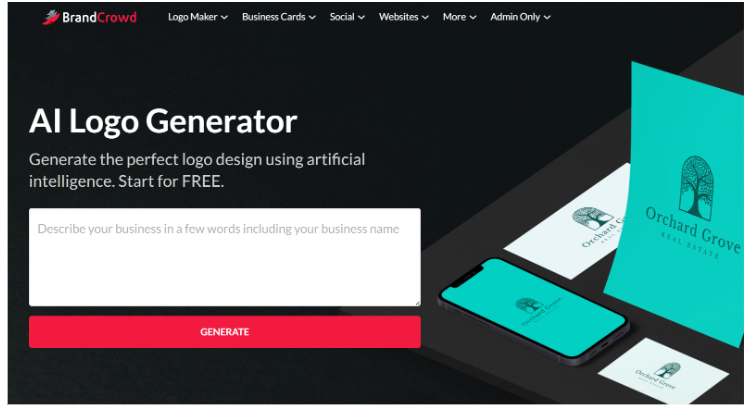
From there, enter keywords that can best describe your business. Let’s say that you run an organic and eco-friendly coffee shop. Some keywords that you can use are organic, eco-friendly, environment, brew, coffee, coffee beans, or coffee cup.
You get the idea. Make sure to choose keywords that best represent you and one you want to see in the design. So if you want a logo with coffee beans or one with a coffee cup, make sure to put that in your description for best results. Next, enter your business name.
This will help the generator find a design harmonizing with your name. And if you don’t have a name yet, don’t fret! We also have a business name generator you can use, or browse our article about choosing the right name for your business.
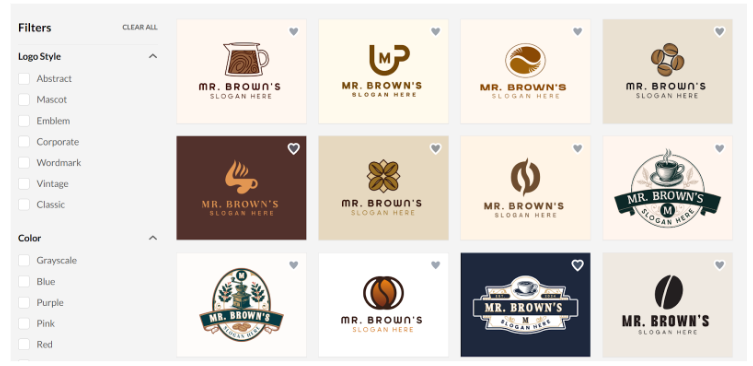
Done? You can then click “Generate.” Give it a few seconds, and a whole collection of logo designs will appear. Choose one that best suits you. You can also filter the results by logo style or color.
- Customize your design
If you want to fine-tune your chosen design further, you can do so using our tool. You can adjust the font, color, layout, or background. You can also add shapes or icons if you want. And do you fancy adding animation? That’s also possible in our AI logo generator!
Each customization feature also offers more editing options in your design. For example, the text. Aside from changing the font style or size, you can also change the alignment, adjust the spacing, curve the text, or automatically add an outline or shadow to it.
Check out some of the generated logos below:
Brown Hot Coffee by BrandCrowd
Eco-friendly Coffee by BrandCrowd
Coffee Bean Badge by BrandCrowd
Milk Coffee Cafe by BrandCrowd
Coffee Bean Cafe by BrandCrowd
Once you’re happy with your finished design, you can download it. This will come in PNG, JPG, SVG, EPS, and PDF format. The PDF format can be convenient since you can make quick adjustments with a PDF editor or easily add your logo to your marketing materials.
- Pair it with our other branding materials
Your logo is the first step in building your brand identity. Make sure you also have a set font, color palette, or graphic style to have an aesthetic that your customers can recognize. If you have the time, consider making a brand kit as well.
This might seem extra to do now, but trust us, building your branding right from the start is better. It’s not an overnight process; the earlier you start, the better. If you need expert guidance on creating a cohesive brand strategy, partnering with a digital marketing agency can help ensure all your visual elements work together effectively.
You can also take your branding efforts to the next level with other materials like business cards, posters, email signatures, etc. Harness the power of social media with your Instagram covers or Facebook ads. Don’t forget to display your sparkling new logo on these materials to boost your brand awareness.
Create Your Logo Design Today
AI has been a game-changer, particularly in the field of design. With AI logo generators now in our hands, you can design a logo in just a few clicks. This is why it’s a popular choice for startups, new business owners, or individuals who may not have lots of time and resources.
However, don’t forget that at the end of the day, AI is still a machine. It still needs your creative vision and input to produce an outstanding design that fits your business. Study what makes an excellent logo design and understand your brand first before creating your design.
Pair your new logo with our templates, such as flyers, TikTok videos, YouTube banners, and more, to maximize your branding.
We hope the above tips have helped you. Until next time!
Read more on AI and logo design here:
- 40 Sleek Futuristic Logo Designs
- 70 Artificial Intelligence Logo Ideas for Pioneering AI Companies
- The Role of AI and Machine Learning in the Creative Process
AI Logo Generator FAQs
1. What exactly is an AI logo generator, and how does it work?
An AI logo generator is a tool that uses machine learning technology to analyze common logo patterns, designs, colors, typography, shapes, styles, and trends. When you provide keywords and your business name, the AI algorithm processes this information and generates multiple logo designs that match your desired look and business requirements. The entire process takes just seconds, making it much faster than traditional design methods.
2. How much does it cost to use an AI logo generator?
Many AI logo generators are completely free to use, while others charge minimal fees or one-time payments. This makes them significantly more affordable than hiring marketing agencies or freelance designers, which can be quite expensive. Cost-effectiveness is one of the main advantages, especially for startups and small business owners working with limited budgets.
3. Do I need design experience to use an AI logo generator?
No design experience is required. AI logo generators are designed to be beginner-friendly and perfect for business owners who don’t have creative skills or a design background. The tools typically feature simple, easy-to-navigate interfaces with drag-and-drop functionality. The AI does the heavy lifting. All you need is your vision and some basic keywords describing your business.
4. Can I customize the logo after the AI generates it?
Yes, most quality AI logo generators offer extensive customization options. You can typically adjust fonts, colors, layouts, backgrounds, and add shapes or icons. Advanced features may include animation options, text effects like outlines or shadows, spacing adjustments, and text curving. This ensures your logo is unique and tailored to your specific preferences rather than being completely generic.
5. What file formats will I receive when I download my AI-generated logo?
Most AI logo generators provide your finished logo in multiple professional file formats, including PNG, JPG, SVG, EPS, and PDF. This variety ensures you can use your logo across different platforms and materials, from digital applications to print materials like business cards and marketing collateral. Having multiple formats gives you flexibility for all your branding needs.